
Recallab › Blog › Meet MentorQs: the MCQs that talk back
Meet MentorQs: the MCQs that talk back
Ten ways to turn a question, an AI mentor and a Professor’s take into a daily learning habit.
Create your free account and try a MentorQ →Free account, no card needed.
You have read the explanation twice. You know which option is correct. But you still cannot see why your answer was wrong.
Sometimes the missing piece is small: an unfamiliar term, a step in a mechanism, or the difference between two options that both seem reasonable. What you need at that moment is a way to ask a follow-up question.
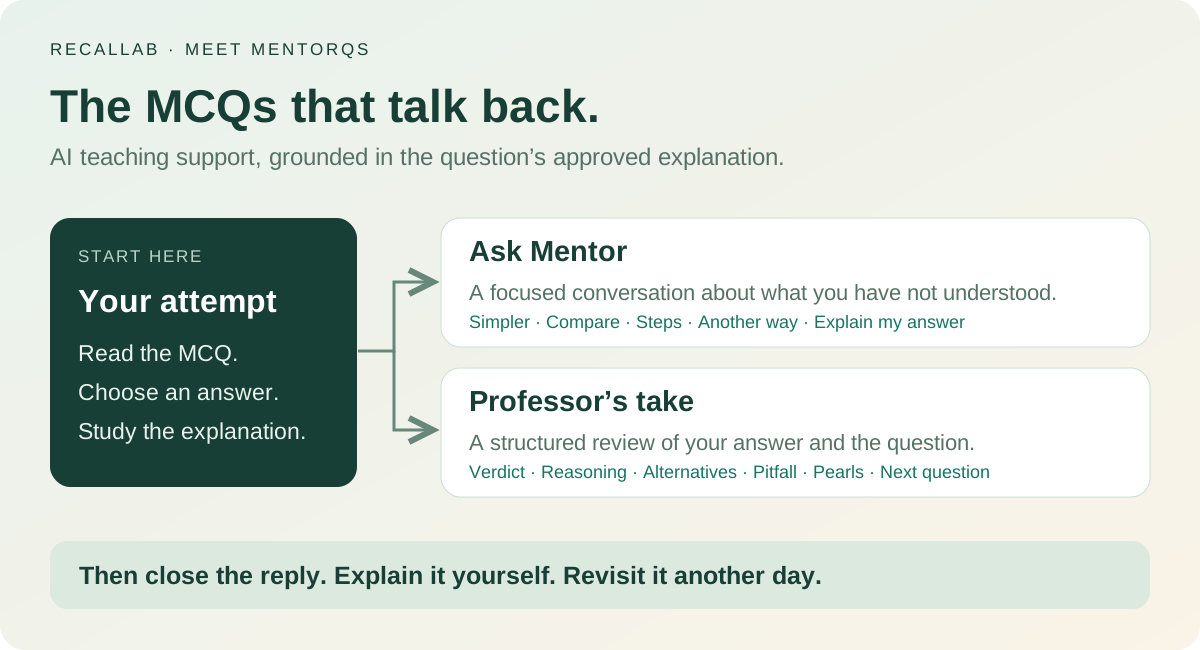
That is the idea behind MentorQs: MCQs with mentors. A MentorQ combines a multiple-choice question and its referenced explanation with two forms of AI teaching support: a conversational Tutor, presented as Ask Mentor, and Professor’s take, a structured review of the answer you chose.
They are AI teaching roles, not a human tutor and professor assigned to each candidate. Think of them as two ways to discuss the question when the written explanation has not quite resolved your doubt.
 View larger ↗⤢ Tap to enlarge
What is inside a MentorQ?
The MentorQs introduction describes questions with checked answers, explanations for the alternatives, textbook references and purpose-made figures. The AI support is designed to work from the approved explanation for that particular question.
The bank passed 10,000 MentorQs on 23 September 2026 and is built in checked batches towards 22,000 by 1 January 2027, so the number grows every week.
| Ask Mentor | Professor’s take |
|---|---|
| A focused conversation about the question | One considered review of your answer |
| Entry points include Explain my answer, Simpler, Compare, Steps and Another way | Covers the verdict, reasoning, alternatives, pitfall, pearls and a follow-up question |
| Up to five messages on a question, subject to your account allowance | One take per question, subject to your account allowance; the description says it also reads the figure |
The per-question conversation limit sits within your package’s daily AI allowance. Mentor messages and Professor’s takes have separate allowances. The Tutor and Professor page explains the two roles in more detail.
Here are ten situations where that support can be useful—and how to use it actively.
1. Find the precise reason your answer failed
A wrong answer does not always mean you knew nothing. You may have remembered a true fact but applied it to the wrong question, or chosen something relevant that was incomplete.
Use Explain my answer to focus on the choice you actually made. Then identify the sentence or clue that should have changed your decision.
Try asking: “I chose this because of the association I remembered. Which part of the stem makes that reasoning insufficient?”
Leave with a specific correction you can use next time. “Read more carefully” is less helpful than knowing exactly what you overlooked.
2. Make difficult language easier to understand
Sometimes the obstacle is the wording rather than the concept. A dense explanation can assume a level of familiarity you have not yet reached.
Use Simpler to get a plainer account. Then connect that account back to the proper medical terms: the examination will still expect you to recognise them.
Try asking: “Explain this in plain language first, then connect each step to the technical term in the explanation.”
The useful outcome is being able to move between ordinary language and precise terminology yourself.
3. Separate two plausible options
Knowing why the correct option fits is only half the task when a distractor also seems convincing. The important detail may be a distinction you have repeatedly blurred.
Use Compare for the pair that confused you. Concentrate on the feature that changes the answer in this stem.
Try asking: “Compare my option with the correct one. What is the deciding difference here?”
After reading the reply, hide it and state the difference in one sentence. That becomes a compact revision prompt.
4. Recover a missing step in the reasoning
An explanation can feel clear until you try to reproduce it. Then you discover that you can remember the beginning and the conclusion but cannot connect them.
Use Steps to unpack the chain. Pause at each transition and ask why it follows from the previous one.
Try asking: “Take me from the finding in the stem to the answer, one step at a time. Where does the key mechanism enter?”
Reading a numbered explanation is still reading. Test it by rebuilding the sequence without looking.
5. Try another way of seeing the same idea
Repeating the same paragraph may not help when its organisation is the problem. You may need a comparison, a shorter sequence or a different arrangement of the information already available.
Use Another way when the first explanation has not made the relationship clear.
Try asking: “Reorganise the explanation as a short cause-and-effect chain, keeping the same facts.”
Treat analogies as aids rather than exact models. Bring the explanation back to the actual mechanism and the question before moving on.
[Explore the recorded MentorQ example](/about/mentorqs/) to see the question, the learner’s choice and both forms of AI support together.
6. Connect the picture with the explanation
A figure is most useful when you know what to inspect. You might recognise the labels yet miss why a particular arrow, boundary or comparison matters to the answer.
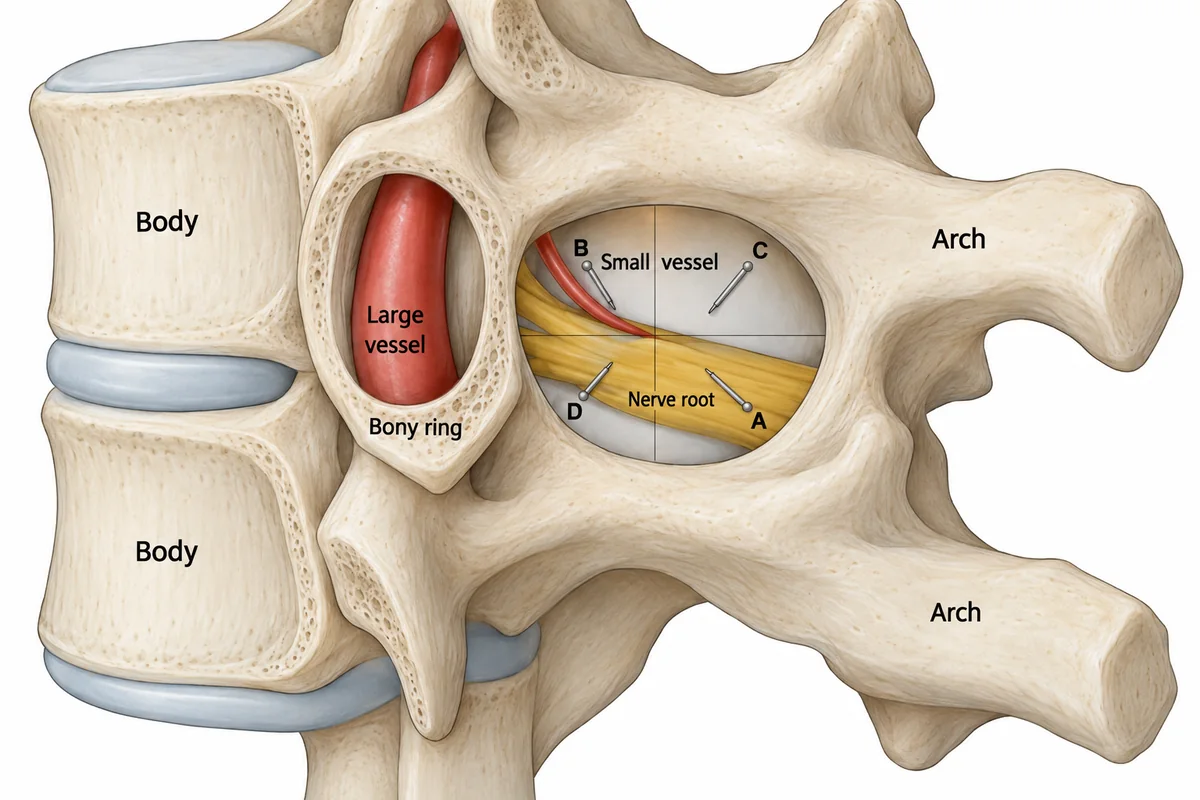
Consider this labelled illustration. The challenge is to connect the positions of the nerve root, vessels and surrounding bone, rather than memorising the labels in isolation:
 View larger ↗⤢ Tap to enlarge
The Professor feature is described as reading the question’s figure as well as its content. Use its interpretation to identify the visual relationship being tested, then trace that relationship yourself.
Try this: point to the relevant part of the figure and explain how it supports the answer. If a label or interpretation seems inconsistent, check the approved explanation and reference rather than relying on the AI response alone. For more on learning from figures, see why illustrated MCQs belong in your NEET PG preparation.
7. Get a structured review when several things went wrong
A short exchange works well for a narrow doubt. Sometimes you need to step back and review the whole attempt: your choice, the reasoning, the competing options and the trap.
That is where Professor’s take has a different role. Its structured format brings those elements together and ends with learning points and a further question.
Use it effectively: attempt the MCQ first, read the standard explanation, and request the take when you need that fuller review. Afterwards, select one or two points to retrieve later. Copying the entire response into your notes can create another long passage you never test yourself on.
8. Keep the discussion tied to the question’s evidence
A follow-up conversation is easier to evaluate when you can compare it with the explanation and its named reference. Recallab describes both AI roles as grounded in that approved material.
That is a useful design boundary. It also means the mentor should not be treated as an unrestricted source for every related clinical question. A wider issue may need a textbook, an updated guideline or another suitable source.
Try asking: “Which part of the approved explanation supports that conclusion?”
Grounding is a safeguard, not proof that every generated sentence is correct. If the response contradicts the source or appears to go beyond it, verify the point. The purpose of the discussion is to clarify your reasoning, not to replace your judgement.
9. Turn the reply into a test of your own understanding
A fluent answer can feel satisfying before you have learned to produce the reasoning yourself. Finish a discussion with an attempt at recall.
Use the Professor’s follow-up question, or turn the unresolved point into your own short prompt. Answer before looking at the explanation again.
Try this: “Without reopening the reply, can I explain why my option was wrong and identify the clue that supports the correct one?”
Research on medical MCQs has found that explanatory feedback can support performance on related new questions better than right/wrong feedback alone. That supports engaging with the reasoning; it does not demonstrate that any particular AI product improves examination scores. Ryan and colleagues, 2020, Perspectives on Medical Education
10. Give tomorrow’s learning a clear starting point
A useful mentor conversation should leave something small and specific to revisit: a distinction, a mechanism, a mistaken assumption or a question you could not answer confidently.
Keep a short daily record with three lines: what I misunderstood, the corrected idea, and the question I will use to check it. At the next session, answer that question before rereading the note.
Where your account provides them, Recallab’s revision tools can help organise the return: Due Today for scheduled practice, Second Chance for errors and Lucky Guesses for answers you got right after reporting a guess. The AI discussion helps clarify the gap; a later attempt checks whether it is closing.
[Open Recallab Apps](/#/apps) and pair a small set of new questions with revision of earlier uncertainties.
Why daily learning matters
A manageable daily session creates repeated opportunities to attempt, receive feedback and revisit. The benefit comes from what you do across those sessions—not simply from keeping a streak alive.
A randomised study of medical students found that clinical scenarios and questions distributed weekly improved retention. This supports spreading learning over time; it does not establish that any particular daily AI allowance is the uniquely best learning schedule. Kerfoot and colleagues, 2007, Medical Education
Daily practice is a practical way to make that spacing habitual. It also reduces the size of the next task: rather than waiting for a free weekend to repair a growing backlog, you can return to a few uncertain ideas today. If you miss a day, resume with a manageable session. An unbroken streak is not a requirement for learning.
There is a difference between studying every day and repeatedly seeing the same answer without effort. Mix new material with older questions, attempt recall before opening explanations and use the mentor selectively where it helps you move past a specific difficulty.
Daily AI support that adds up across the year
MentorQs are designed to make discussion part of your regular study routine. The package allowances give you fresh opportunities each day to ask about a difficult option, unpack a mechanism or get a considered Professor’s take. The daily limits here are on AI use: Mentor messages and Professor’s takes.
Across the three larger packages, that daily support adds up to substantial teaching time over a year:
| Package | Mentor messages each day | Mentor messages over 365 days | Professor’s takes each day | Professor’s takes over 365 days |
|---|---|---|---|---|
| Plus | 25 | Up to 9,125 | Not included | Not included |
| Premium | 50 | Up to 18,250 | 5 | Up to 1,825 |
| Pro Learner | 100 | Up to 36,500 | 6 | Up to 2,190 |
Plus provides room for regular focused questions alongside your practice. Premium doubles the daily Mentor allowance and adds five opportunities a day for a fuller Professor’s review. Pro Learner offers the largest daily allowance: 100 Mentor messages and six Professor’s takes, giving you more room to work through several areas of uncertainty.
For a lighter level of support, the published Standard package lists five Mentor messages a day—up to 1,825 over 365 days—with no Professor’s takes.
The yearly figures are daily allowances multiplied by 365. They show the potential across a full year if you use the allowance every day; they are not a lump sum of annual credits available to spend at once. A message is also not a whole question or a minute of tuition: one difficult MentorQ may take several messages, within the per-question limit.
These are the package allowances listed on the pricing page, checked on 21 September 2026. The packages are currently marked as not yet on sale; the table describes their published allowances, not a purchase offer or the allowance of a temporary access programme.
Why the AI allowance renews daily
One intention behind the daily structure is to encourage regular learning conversations. Resolve a doubt today, try recalling the idea tomorrow, and use the next discussion to address what is still unclear. Across weeks and months, that creates repeated opportunities to turn uncertainty into understanding.
Imagine using a few Mentor messages to separate two confusing options today. At the next session, explain the distinction without opening the reply. If it still breaks down, ask about the exact step you cannot reconstruct. The conversation then builds on your own attempt rather than becoming another passage to read passively.
The limit gives that routine a daily rhythm. It does not mean you must use every message or request a Professor’s take on every question. Use the support where it helps, then leave time to practise independently. The educational value comes from the questions you bring, the corrections you make and the ideas you can later retrieve—not from exhausting an allowance.
[Compare the AI packages](/pricing.html) and choose the level of daily support that fits the way you study when subscriptions become available.
A daily MentorQ routine worth trying
Start with a few earlier errors or uncertain answers. Attempt a manageable set of new MentorQs and read their explanations. Choose the one or two doubts that remain and use the appropriate mentor tool: Simpler for language, Compare for alternatives, Steps for a reasoning gap, or Professor’s take for a fuller review.
Then close the replies. Explain the difficult idea yourself, write one precise reminder and make it part of a later session. Adjust the workload to your time, curriculum gaps and exam date.
The most useful MentorQ conversation ends when you can do something you could not do before: explain a mechanism, distinguish two options or recognise why your reasoning failed. Return later and check that you still can.
Try a MentorQ and bring one specific question to its mentor. You can also read [how to choose a realistic MCQ target](/blog/how-many-mcqs-neet-pg-ini-cet/) before planning your daily workload.
Create your free account and try a MentorQFree account, no card needed. Practise with every option explained and a reference on every question.